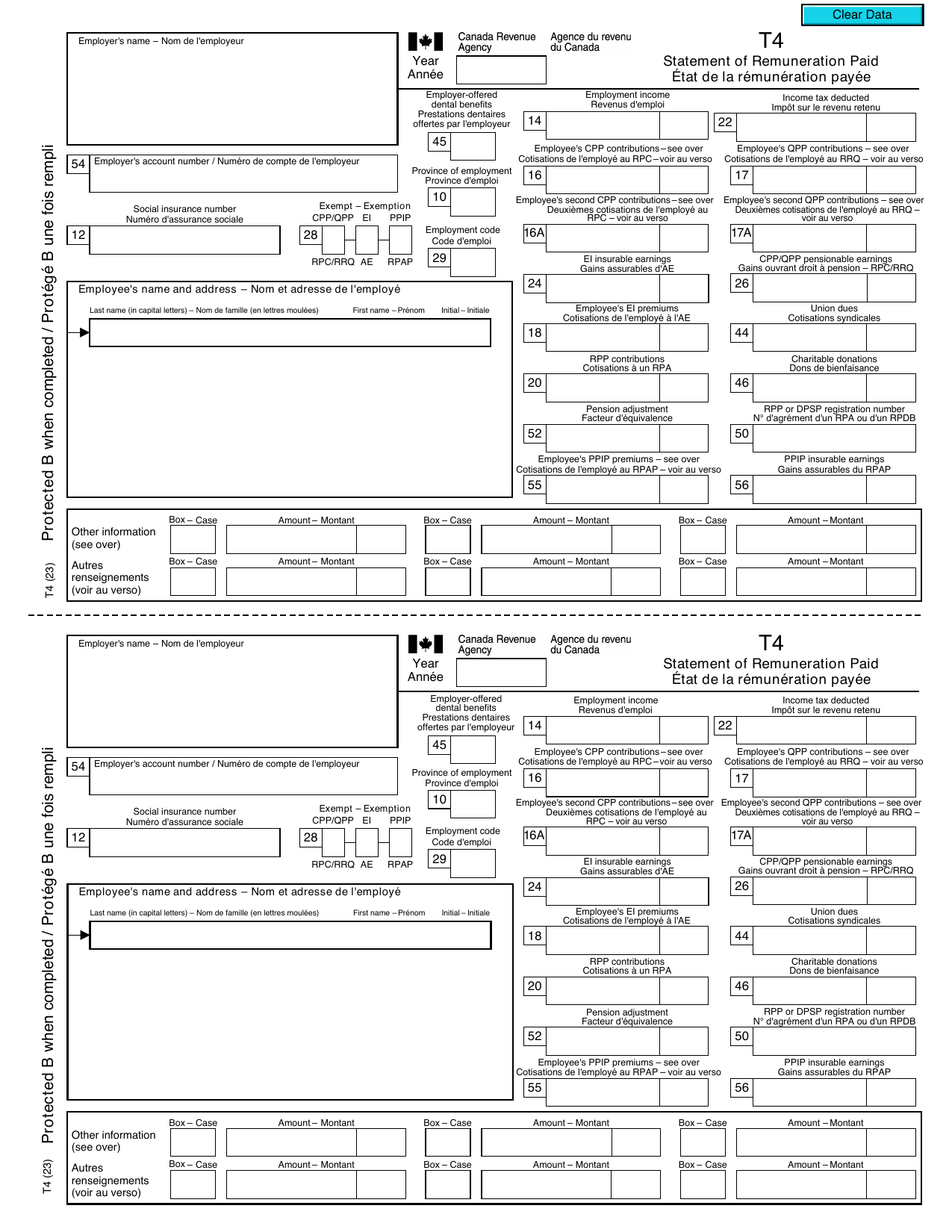
If you received a T4 slip this tax season, you are already one step ahead — this small document contains everything the Canada Revenue Agency (CRA) needs to verify your employment income and ensure the right amount of tax was withheld throughout the year. Whether you are a first-time filer or a seasoned employee, understanding every box on your T4 can help you avoid errors on your T1 return, claim the deductions you are entitled to, and file with confidence before the April 30 deadline.
What Is a T4 Slip?
A T4 slip — formally called a Statement of Remuneration Paid — is an official CRA form your employer must prepare for any employee who received employment income during the calendar year. It captures not just your gross wages but also the statutory deductions that were withheld on your behalf: Canada Pension Plan (CPP) contributions, Employment Insurance (EI) premiums, and federal and provincial income tax.
T4
Statement of Remuneration Paid — CRA T4 Slip
2024 tax year
Official CRA T4 — issued by employer by February 28 each year
Your employer files a T4 Summary with the CRA and provides you with a copy no later than February 28, 2025 for the 2024 tax year. If you worked for more than one employer during the year, you will receive a separate T4 from each one. All slips must be reported on your T1 return — there is no option to pick and choose.
Who Must Issue a T4?
Any employer who paid an employee remuneration of any amount during the year, or deducted CPP contributions or EI premiums from a worker's pay, must issue a T4. This includes:
- Full-time and part-time employees
- Employees paid in cash, cheque, or direct deposit
- Employees who received taxable benefits (company car, group term life insurance, etc.)
- Corporate owner-managers who pay themselves a salary rather than dividends
- Seasonal and temporary workers — even a single pay period triggers the requirement
Independent contractors do not receive T4 slips; they receive T4A slips instead. The distinction matters because contractors are responsible for their own CPP contributions and do not have EI deducted at source.
How to Read Every Box on Your T4
The T4 slip is divided into lettered and numbered boxes. Here is a plain-language guide to the ones you are most likely to see:
Income Boxes
- Box 14 — Employment Income: Your total gross employment income for the year, before any deductions. This is the figure that flows directly to line 10100 of your T1 return.
- Box 24 — EI Insurable Earnings: The portion of your income subject to EI premiums. For 2025 the maximum insurable earnings are $65,700.
- Box 26 — CPP/QPP Pensionable Earnings: The portion subject to CPP contributions. For 2025 the Year's Maximum Pensionable Earnings (YMPE) is $71,300.
- Box 28 — Exempt (CPP/EI/PPIP): Checked if your employer has granted an exemption — common for certain Indigenous employment situations or specific employment types.
Deduction Boxes
- Box 16 — Employee CPP Contributions: The amount withheld for CPP. For 2025, the employee contribution rate is 5.95% on earnings between the basic exemption ($3,500) and the YMPE of $71,300), to a maximum of approximately $4,034.10.
- Box 16A — Employee Second CPP Contributions (CPP2): Since the second CPP earnings tier introduced in 2024, employees earning above the first ceiling also contribute to CPP2 on income up to a second, higher ceiling. For 2025 the CPP2 rate is 4% on earnings between $71,300 and the second ceiling of $81,900, for a maximum additional contribution of $432.00. This is a separate box from the base CPP contribution in Box 16 and is easy to overlook when reconciling pay stubs.
- Box 17 — Employee QPP Contributions: Quebec workers contribute to QPP instead of CPP.
- Box 18 — Employee EI Premiums: The amount withheld for Employment Insurance at 1.64% of insurable earnings in 2025 (outside Quebec).
- Box 22 — Income Tax Deducted: Total federal and provincial income tax withheld and remitted to the CRA. This amount appears on line 43700 of your T1 return as a tax credit against what you owe.
Benefit and Other Boxes
- Box 30 — Board and Lodging: Taxable value of accommodation and meals provided by your employer.
- Box 32 — Travel in a Designated Remote Area: Travel benefits you may deduct under CRA's northern residents rules.
- Box 40 — Other Taxable Allowances and Benefits: Catch-all box for benefits like personal use of a company vehicle, employer-paid memberships, or gifts exceeding the CRA's administrative threshold.
- Box 44 — Union Dues: Dues paid to a trade union or professional association — deductible on line 21200 of your T1.
- Box 46 — Charitable Donations: Payroll deductions donated to registered charities through your employer's program.
- Box 52 — Pension Adjustment (PA): Reduces your RRSP contribution room for the following year if you participate in a registered pension plan. This does not affect the current year's RRSP limit.
- Box 57–60 — Employment Income — Periods: Introduced during the pandemic to report employment income by quarter; used for benefit verification purposes.
- Box 38 — Stock Option Benefit: The taxable benefit that arises when you exercise employee stock options. This amount is already folded into Box 14, so you do not add it separately, but it explains why Box 14 can be significantly higher than your salary in a year you exercised options.
- Box 67 — Retiring Allowance Eligible for RRSP: If you received a retiring allowance (severance) tied to pre-1996 service, this portion can be contributed directly to an RRSP without using your regular contribution room. Not everyone qualifies — the eligibility depends on your years of service before 1996 and 1989.
Your Box 14 total can also be higher than your take-home pay for reasons beyond straightforward income tax withholding. CRA requires several employer-provided perks to be added to your employment income as taxable benefits, typically flowing through Box 40 or a benefit-specific box: group term life insurance premiums your employer paid above $500, the standby charge and operating-expense benefit for personal use of a company vehicle, employer-paid parking in a commercial lot, the benefit from an interest-free or low-interest employer loan priced below the CRA's prescribed rate, personal use of an employer-provided cell phone beyond a reasonable allowance, and gifts or awards from your employer exceeding $500 in the year. None of these show up as cash in your bank account, but all of them are taxable income and are already included in Box 14 — so do not add them again when estimating your return.
Practical Example: Reading a 2024 T4 Slip
Consider a Calgary employee, Sarah, who earned $85,000 in salary from a single employer during 2024. Her T4 might look like this:
| Box |
Description |
Amount (CAD) |
| 14 |
Employment Income |
$85,000.00 |
| 16 |
Employee CPP Contributions |
$4,034.10 |
| 18 |
Employee EI Premiums |
$1,077.48 |
| 22 |
Income Tax Deducted |
$18,450.00 |
| 24 |
EI Insurable Earnings |
$65,700.00 |
| 26 |
CPP Pensionable Earnings |
$71,300.00 |
| 52 |
Pension Adjustment |
$3,600.00 |
Sarah's RRSP contribution limit for 2025 is 18% of her 2024 earned income ($85,000 × 18% = $15,300), minus the pension adjustment of $3,600, giving her an available room of $11,700 — well below the 2025 RRSP dollar limit of $32,490. She can verify this figure on her most recent CRA Notice of Assessment or through My Account.
Key 2025 Tax Numbers to Know When Filing Your T4
- Federal Basic Personal Amount: $16,129 — the income amount on which no federal tax is payable
- CPP YMPE: $71,300 — maximum CPP pensionable earnings
- RRSP 2025 Contribution Limit: $32,490 — subject to your personal earned income calculation
- TFSA Annual Limit: $7,000 — cumulative room continues to grow regardless of income
- T1 Filing Deadline: April 30, 2025 for most Canadians; June 15, 2025 if you or your spouse are self-employed (though any balance owing is still due April 30)
Common T4 Mistakes and How to Avoid Them
Even straightforward employment income can produce filing errors. Watch out for these:
- Forgetting a slip: The CRA automatically matches T4 data it receives from employers to your filed return. An unreported T4 triggers a reassessment and potential interest charges.
- Misreading Box 52: The pension adjustment does not reduce your current RRSP limit — it reduces next year's room. Do not deduct it manually from your current contribution calculation.
- Overlooking taxable benefits in Box 40: These are already included in Box 14, so you do not add them twice — but they are taxable and cannot be ignored.
- Entering Box 22 in the wrong line: Income tax deducted belongs on line 43700, not as a deduction from income. Entering it incorrectly can overstate your refund and invite a CRA review.
- A transposed Social Insurance Number: Even a single wrong digit means CRA cannot match the slip to your file, which can delay processing of your return until the mismatch is resolved.
- Double-counted benefits: Some payroll systems report a taxable benefit in both its own dedicated box and Box 40, which inflates Box 14 by counting the same benefit twice. Compare your final pay stub against your T4 if the total looks unexpectedly high.
What Employers Need to Know About T4 Deadlines
If you are a business owner running payroll — whether in Calgary or anywhere else in Canada — the T4 obligations are straightforward but non-negotiable. You must:
- File the T4 Summary and all individual T4 slips with the CRA by February 28, 2025
- Distribute copies to each employee by the same deadline
- File electronically if you are submitting 6 or more slips (the CRA strongly recommends electronic filing in all cases)
- Retain payroll records for at least six years in case of a CRA audit
Late filing penalties start at $100 and escalate based on the number of slips and degree of delay. At Swift Accounting Ltd. in Calgary, we prepare and file T4 packages for small and mid-sized businesses year-round, ensuring your obligations are met accurately and on time.
Frequently Asked Questions
What do I do if my employer has not sent my T4 by February 28?
Contact your employer or payroll department first. If you cannot obtain the slip by mid-March, you can call the CRA at 1-800-959-8281 and they will contact your employer on your behalf. You should still file your return on time using your final pay stub to estimate the figures, then adjust after receiving the official slip.
Can I have my T4 corrected after it is issued?
Yes. If you believe there is an error — for example, your employment income is wrong or CPP contributions are misstated — notify your employer's payroll department. They can file an amended T4 (marked "amended") with the CRA and provide you with a corrected copy. If the error affects a previously filed T1, you may need to file a T1 Adjustment Request (T1-ADJ).
What if I have multiple T4 slips from different employers?
Report each T4 separately on your T1 return. The CRA's NETFILE-certified software handles multiple T4s easily. Be aware that over-contributions to CPP can occur when you have two or more employers, since each withholds independently up to the annual maximum — for 2025 that maximum is $4,034.10 for base CPP (Box 16) plus up to $432.00 for the second CPP tier, CPP2 (Box 16A). Any over-contribution across all your slips is refundable on line 44800 of your T1.
Does a T4 slip affect my TFSA contribution room?
No. Unlike RRSP room — which is tied to earned income reported on your T4 — your TFSA contribution room accumulates at a fixed rate set by the government regardless of your employment income. For 2025, every eligible Canadian resident 18 or older gains $7,000 in new TFSA room, bringing the cumulative lifetime limit to $102,000 for those who have been eligible since 2009.
Ready to File With Confidence?
Understanding your T4 is the foundation of an accurate personal tax return, but employment income is rarely the only piece of the puzzle. Rental income, investment gains, RRSP contributions, and deductible employment expenses all interact in ways that can significantly affect your tax outcome. Whether you are an employee with a straightforward return or a business owner juggling payroll, corporate filings, and personal taxes, the team at Swift Accounting Ltd. is here to help. Contact us today to speak with a Calgary tax professional who can review your slips, maximise your deductions, and ensure you meet every CRA deadline.